Cooking Crush - Cooking Game
- 4.7
- Rating
- 10.00M
- Installs
- Free
- Price

 Analysis by App-foxy
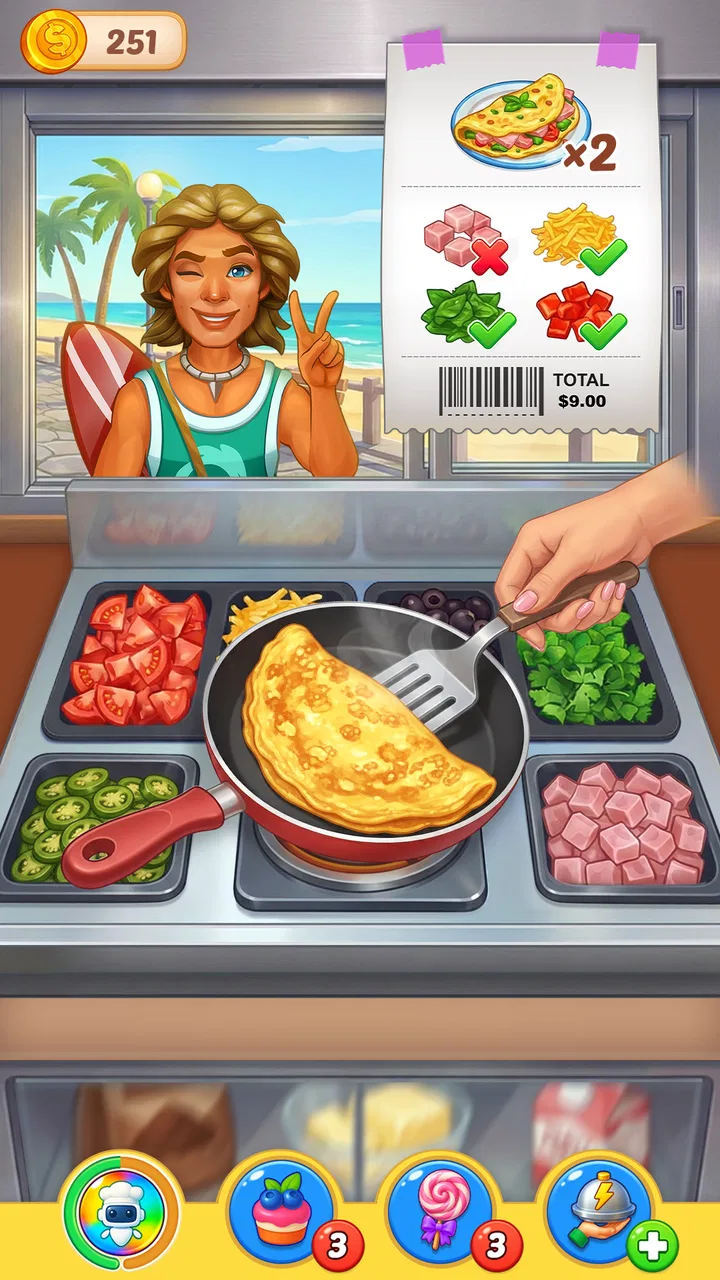
Cooking Crush is the kind of arcade game I open when I want quick, energetic rounds rather than a slow strategy session. Its central appeal is simple to understand: I step into a busy restaurant kitchen, prepare orders under pressure, and try to keep the service moving before the queue becomes unmanageable. That time-management focus gives every level a clear rhythm, but it also means the game asks for attention almost immediately.
After spending time with it, I found that the most important capability is not merely cooking food. It is prioritizing several orders while the kitchen keeps demanding decisions. That sounds familiar if you have played other restaurant games, yet the effect here is especially noticeable because small mistakes quickly interrupt the flow. I can begin with a straightforward order, then suddenly need to remember what is cooking, what is ready to serve, and which customer should be handled first.
Developed by FlowMotion Entertainment, this free arcade title is aimed at Everyone and runs on devices using Android 5.1 or later. It has built a substantial audience, with over ten million installs and a 4.7 average from around two hundred six thousand ratings. Those figures make sense to me: the basic controls are approachable, the rounds are easy to understand, and the short-session format works well on a phone.
You May Also Like

 Blood Strike: 2.5 Anniversary
Blood Strike’s Loadouts Turn Every Drop Into a Tactical Gamble
A close look at Blood Strike’s custom loadouts: how fast access to signature weapons reshapes its battle royale rhythm, rewards preparation, and narrows the gap between fights.

 Pandora - Music & Podcasts
Pandora’s Music Is Easy to Start, but Harder to Recover
Pandora’s strength is its low-effort path from a seed to a station. Its weak spot is how much confidence it asks you to place in connection, setup, and quiet recovery.

 8 Ball Pool
 Is Built on Rivalries, Rematches, and Routine
A close look at the rivalries, rematches, shared routines, and unanswered safety questions that turn a quick pool match into a persistent mobile community.

 Samsung Music
’s Quiet Strength Is Playing What You Already Own
Its reach comes less from spectacle than from dependable access to a personal library. That simplicity is both the app’s strongest retention engine and its ceiling.

 AccuWeather: Weather Radar
AccuWeather Review: A Quick, Clear Forecast for Everyday Decisions
For everyday plans, the best forecast is the one you can understand quickly. AccuWeather makes rain timing, radar, and local conditions easy to act on, with a few trade-offs.

 Hill Climb Racing
Why Hill Climb Racing Still Turns Crashes Into One More Run
A tiny car, a bumpy hill and one more upgrade: Hill Climb Racing keeps resurfacing because its simple chaos makes every near-miss feel personal.
More From Our News Desk



Cooking Crush turns kitchen multitasking into the main challenge
I found that the kitchen’s multitasking works best when I treat each round as a sequence of small priorities rather than a race to tap everything. That makes the opening goals useful practice: they help me learn what needs attention first and where a careless action can slow service. Once that rhythm becomes familiar, the more important question is how the game signals progress as I move forward.
The capability that shapes every level
The strongest part of Cooking Crush is its time-management loop. I am not simply tapping ingredients in any order and waiting for a result. I have to watch the order area, identify what can be prepared immediately, and decide whether serving one customer now will leave another request in a worse position. The game turns those tiny choices into the real test of skill.
That makes the experience more demanding than its cheerful presentation might suggest. A new player can understand the objective quickly, but consistent success requires a working routine. I learned to scan the whole kitchen before tapping, start anything with a longer preparation process, and use the waiting time to organize the next action. This habit matters more than fast fingers alone.
The capability also gives the game a useful middle ground between a relaxed puzzle and a reflex arcade title. I can play casually when the early stages are forgiving, but later pressure encourages me to think several actions ahead. I would not describe it as a deep restaurant simulation; the attraction is the compact decision-making, not realistic culinary technique. Still, the kitchen theme gives those decisions personality and makes the repeated loop easier to enjoy.
Why the restaurant setting works on a phone
Restaurant service is a natural fit for touch controls because most actions are direct. I can see an item, tap it, and immediately understand what the game expects. There is little need to learn a complicated control scheme before the challenge begins. That accessibility is one reason I would recommend it to someone who wants an arcade game that can be understood during a short break.
The visual language also supports quick recognition. Orders, preparation points, and serving actions are presented as parts of one busy workspace, so I am constantly reading the screen rather than navigating menus. When the pace rises, this clarity becomes more important than decorative detail. If the interface were harder to read, the time-management challenge would feel unfair; in my experience, the pressure usually comes from choosing badly rather than from not knowing where to tap.
There is a trade-off in this simplicity. Players looking for a cooking game built around recipes, ingredient discovery, or a detailed restaurant-building layer may find the focus narrow. Cooking Crush is primarily about handling service efficiently. The kitchen is the stage for the arcade challenge, not a broad simulation of running a food business.
How I approach a busy round
My most reliable method is to treat each order as a small scheduling problem. I first identify actions that can run while I am doing something else, then I serve anything that is already ready before starting another chain. This prevents the screen from filling with unfinished tasks. It is tempting to react to the newest customer every time, but that can leave a prepared item waiting while a longer action has not even started.
A useful habit is to avoid tapping simply because a button is available. Every tap should have a purpose: begin preparation, complete an order, or protect the next few seconds of the round. That sounds obvious, but the game’s pressure encourages hurried input. I found that deliberate tapping often produced better results than frantic tapping, especially when several requests appeared close together.
I also recommend learning the visual rhythm of a location before trying to play perfectly. The first attempts are valuable because they reveal which actions tend to create a bottleneck. Once I know what usually slows a round down, I can reserve my attention for that point instead of treating every order as equally urgent. This is one of the less obvious strengths of the design: repetition can teach planning rather than merely demanding speed.
A realistic everyday use case
For me, the best scenario is a ten-minute wait: standing in line, taking a short break, or riding somewhere as a passenger. I can start a round without committing to a long session, focus on the immediate kitchen problem, and stop when the moment ends. The game’s arcade structure makes that practical because I do not need to remember a complicated story or reconstruct a large world after putting the phone away.
It also works when I want a mental reset after a long task. The concentration required is enough to pull my attention away from work, but the rules remain familiar enough that I do not spend the whole break learning systems. I would, however, avoid opening it when I need something genuinely calming. The customer pressure and constant prioritizing can feel stimulating rather than restful, particularly after a tiring day.
Another good use is as a shared casual game for someone who does not usually play games. The basic restaurant idea is immediately understandable, and a friend can watch a round and offer suggestions without needing a long explanation. It is less suitable for a group looking for a competitive multiplayer activity, since its appeal comes from improving personal handling of the kitchen rather than directly competing with another player.
Where it differs from other cooking games
Compared with slower cooking or restaurant-management games, Cooking Crush puts more weight on immediate service decisions. I am not drawn into a long planning layer before the action begins; the main question is what to do next while orders are active. That makes it more accessible than a management game with extensive menus, upgrades, and business administration.
Compared with very simple tap-to-score arcade games, it offers more room for judgment. Success is not only about reacting quickly. I need to sequence tasks and recognize which customer or preparation step deserves attention. This gives the game more staying power than a single-action time killer, although players who prefer completely predictable repetition may find the pressure less comfortable.
The comparison also explains who should choose something else. If I want a peaceful decorating game, a narrative cooking adventure, or a detailed simulation where ingredients behave realistically, this is not the right substitute. I would choose Cooking Crush when I specifically want compact kitchen multitasking and the satisfaction of improving a hectic service routine.
Small decisions that make a noticeable difference
One practical insight is that I should think about the next order before the current one is fully finished. Waiting until an item is served before considering what follows creates dead time. Preparing mentally for the next request keeps the round moving and reduces the chance of staring at the screen while something important remains untouched.
A second insight is to protect attention rather than chase every possible action. When the kitchen becomes crowded, I get better results by focusing on the order that can be completed cleanly and the preparation step with the greatest delay. Trying to acknowledge everything at once often causes more errors. The game rewards a controlled sequence, even though its presentation encourages urgency.
A third insight is that replaying a difficult stage can be useful even when the first attempt feels unsuccessful. I can use the repeat to test one change in my routine: starting a different item first, serving in another order, or leaving fewer tasks active at once. This turns failure into a small experiment. Players who only want constant new content may dislike that repetition, but players who enjoy refining a route can get more from it.
There is also a device-related consideration. Because the game depends on seeing several active elements and tapping accurately under time pressure, a small screen or an older device that struggles with touch responsiveness can make the experience less comfortable. The minimum operating-system requirement is Android 5.1, and the current version is 6.2.0. On a suitable phone, the concept is easy to follow; on a cramped display, the same speed can feel more tiring.
Free access and the spending question
The game is free to download, which makes it easy to try before deciding whether its loop suits me. There are in-app purchases ranging from $0.99 to $499.99 per item. That wide range is worth noticing even if I intend to play without spending. I would approach the purchase options carefully, especially if the phone is shared with a younger player, because the Everyone age rating describes the intended content audience, not a promise that every player will make sensible purchase decisions.
For a free arcade game, the important question is whether I enjoy the basic service loop without feeling pushed toward extras. My advice is to play enough ordinary rounds to decide that first. If the central multitasking is already satisfying, optional spending may feel like a convenience rather than a requirement. If the basic rhythm is not enjoyable, purchases will not fix the underlying mismatch.
This is also where the game may lose players who dislike any form of monetization in free mobile titles. Someone seeking a one-time purchase with a completely uninterrupted experience may be happier with a paid alternative. Cooking Crush is easier to sample, but that convenience comes with the need to pay attention to the purchase environment.
Who gets the most from this game
I think the best audience is anyone who likes short arcade sessions with a clear improvement curve. It suits players who enjoy sorting priorities, learning a repeatable routine, and seeing a chaotic screen become manageable. Fans of time-management cooking games will recognize the appeal, while newcomers can understand the objective without studying a manual.
It is particularly good for people who want a game that occupies the hands and mind for a few minutes at a time. The rounds give me an immediate goal, and the kitchen theme keeps the pressure more inviting than an abstract timer challenge. It can also work for younger players within the Everyone rating, provided an adult handles purchase settings and the child is comfortable with the pace.
I would skip it if I become frustrated by timers, repeated attempts, or the need to make several decisions quickly. I would also look elsewhere if my priority is creative freedom. Cooking Crush gives me a defined service problem to solve; it does not primarily ask me to invent recipes, design a restaurant, or tell a long character-driven story.
My final take after playing
Cooking Crush succeeds because it understands what makes a restaurant arcade game enjoyable: visible orders, immediate actions, and the constant question of what deserves attention next. Its best feature is the way it turns ordinary taps into a compact exercise in scheduling. I found myself improving not by moving faster at random, but by reducing wasted actions and preparing for the next demand.
The limitations are just as clear. The focus is narrow, the pressure may not suit relaxed players, and the in-app purchase range deserves careful handling. It is not a replacement for a deep cooking simulator or a quiet management game. Those are meaningful boundaries, not flaws that every player will experience in the same way.
For me, the recommendation is straightforward: try it if you want a free arcade game built around busy restaurant service and short, repeatable challenges. Give it a fair chance by learning the order of your actions rather than judging it from the first frantic round. If you enjoy turning kitchen chaos into a workable routine, this is where Cooking Crush earns its place on your phone.
FlowMotion Entertainment has kept the concept focused, and the strong audience response reflects how easily the core loop can become habit-forming. Just remember what you are choosing: not a full restaurant simulator, but a touch-friendly test of timing, attention, and prioritization. For the right player, that focused design is precisely the reason to keep coming back.
FAQs for Cooking Crush - Cooking Game
01What is Cooking Crush - Cooking Game?
Cooking Crush - Cooking Game is a fast-paced time-management cooking game where you prepare meals, serve hungry customers, and work to complete level objectives. You typically move between different restaurants or food locations, unlock new recipes and kitchen equipment, and improve your performance by serving dishes quickly and accurately. It is designed for casual play, with short levels that are easy to start but become more challenging over time.
02How do you play Cooking Crush - Cooking Game?
Gameplay focuses on tapping the correct ingredients and appliances in the right order. You cook food, combine items, serve completed dishes, and try to satisfy customers before their patience runs out. Each level usually has specific targets, such as earning a certain number of coins, serving a set number of customers, or avoiding burnt food. Planning your actions and upgrading equipment can make later stages considerably easier.
03Is Cooking Crush - Cooking Game free to download and play?
Cooking Crush - Cooking Game can generally be downloaded and played without an upfront purchase, but the free version may include advertisements and optional in-app purchases. These purchases can provide extra coins, boosters, lives, or other advantages, depending on the version available for your device. You can normally progress without spending money, although some players may find optional upgrades useful when levels become more demanding.
04Can Cooking Crush - Cooking Game be played offline?
Some basic cooking levels may work without a constant internet connection, which is convenient for playing during travel or when mobile data is unavailable. However, online access may still be required for advertisements, rewards, cloud features, updates, special events, or in-app purchases. Offline behavior can vary between Android and iOS versions, so it is best to test the game after installation rather than assuming every feature will be available without internet.
05Is Cooking Crush - Cooking Game suitable for children?
Cooking Crush - Cooking Game is generally easy to understand because its controls are based on simple taps and recognizable cooking actions. Nevertheless, parents should check the recommended age rating and review the game's advertising and purchase settings before allowing children to play. Fast-paced levels may also become frustrating for younger players, while optional purchases can create accidental spending risks unless parental controls or purchase restrictions are enabled.
Pros
- Fast-paced levels keep short play sessions engaging.
- Large variety of recipes and restaurant themes to unlock.
- Bright cartoon graphics make the game appealing for all ages.
- Offline play is convenient when an internet connection is unavailable.
- Regular events can provide extra rewards and new challenges.
Cons
- Energy limits may interrupt longer gaming sessions.
- Later levels can feel difficult without upgraded kitchen equipment.
- Frequent ads may appear between levels or after failed attempts.
- In-app purchases can speed up progress and reduce waiting times.
- Gameplay may become repetitive if you prefer deeper cooking simulation.

Cooking Crush - Cooking Game
Gallery